Advice: Don't Start from Scratch
For help on any of the Academy@LibreTexts Online courses please visit https://support.libretexts.org and submit a support ticket.
Introduction to ADAPT: The session focuses on the details of ADAPT, a homework system within the broader LibreVerse, which aims to provide alternatives to commercial publishers by offering textbooks and ancillary materials like homework, question banks, and more.
- ADAPT as a Question Bank and Homework Platform: ADAPT serves as a central repository for open educational resource question banks and as a platform for delivering and grading homework [11:35].
- Course Structure in ADAPT: The basic structure within ADAPT is organized into courses, which contain assignments, which in turn contain questions [19:49].
- Importing Existing Courses: Faculty can import publicly available courses into their ADAPT account by searching for the course name or related terms [13:44], [16:34]. They can choose to keep or clear the original release dates of assignments upon import [18:35].
- Creating New Courses: Faculty can create new courses from scratch by providing metadata such as school, course title, discipline, and descriptions [13:44], [26:20].
- Course Modality: When creating a course, instructors need to select a modality: traditional (for enrolled students), formative (for public access without an account), or anonymous (students see questions but not answers or autograding) [29:24].
- Sections and CRN: While the section field might be removed in the future for simplicity, it currently allows for organizing a course into multiple sections, each with a unique Course Registration Number (CRN) [31:40]. The CRN is useful for manual grade uploads [33:48].
- Course Term and Dates: Instructors specify the term and start and end dates for their course [34:15].
- Course Visibility (Public vs. Private): Instructors can choose to make their course public, allowing other faculty to find and potentially import it [34:50].
- Course Properties: After creating a course, instructors can access and modify its properties, including general information, sections, student access, graders, auto-release settings, and more [38:48].
- Alpha and Beta Courses: ADAPT allows for the creation of an "alpha" or master course that can be tethered to "beta" courses, enabling the sharing of course structure and updates without student data [39:14].
- Student Access to Courses: Students need an account to access courses. Access can be granted through LMS integration (automatic roster sync), individual email invitations, or section-specific access codes [42:10]. Individual email invitations offer more security against misuse [44:55].
- Auto-Release of Assignments and Feedback: The auto-release feature allows instructors to schedule the visibility of assignments, the availability of problems, due dates, and the release of scores, solutions, and statistics automatically based on set timeframes [48:00].
- Z-Scores for Student Performance: ADAPT provides students with z-scores, indicating how many standard deviations their performance is from the mean, offering a quantitative measure of their standing in the class [53:26].
- Course Analytics: ADAPT tracks learning analytics such as performance, time on task, and students needing intervention, with updates occurring twice a day [54:18].
- Resetting a Course: The "reset course" option erases all student data and enrollments, effectively making the course empty again. Instructors are encouraged to do this after the course ends to protect student data [54:52].
- Formative Courses for Public Showcase: Instructors can create formative courses with public links or QR codes to showcase their questions and assignments without requiring login [1:00:57].
- Accessibility Considerations: While some interactive question types using H5P like drag and drop and the virtual dissection tool may have accessibility limitations, ADAPT offers the possibility of creating alternative, accessible question formats (e.g., multiple choice) with the same informational content [01:02:57].
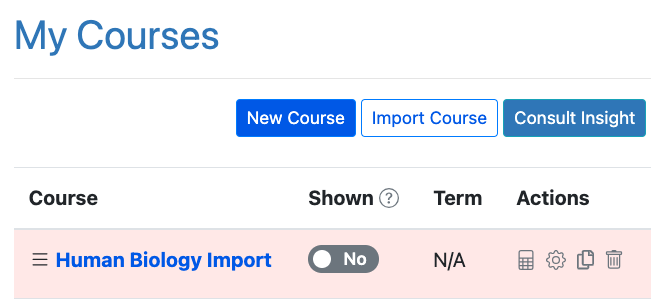
There are many courses that have already been built in ADAPT for many of our textbooks! First step to try out is to simply import a course into your courses. Below, you can see that the entire course with all assignments for Human Biology has been imported. Use the white button, "Import Course," and search for the title of a book or course that would be useful.
There are no comments for now.
to be the first to leave a comment.